Diskscape

See your Mac's disk as space.

Every file becomes a block sized to its exact share of your disk. Find what's eating your space, see what grew this week, uninstall apps without leaving junk behind, and clean up without deleting something you'll regret.

14-day free trial · macOS 14 or later · Apple silicon and Intel · never connects to the internet

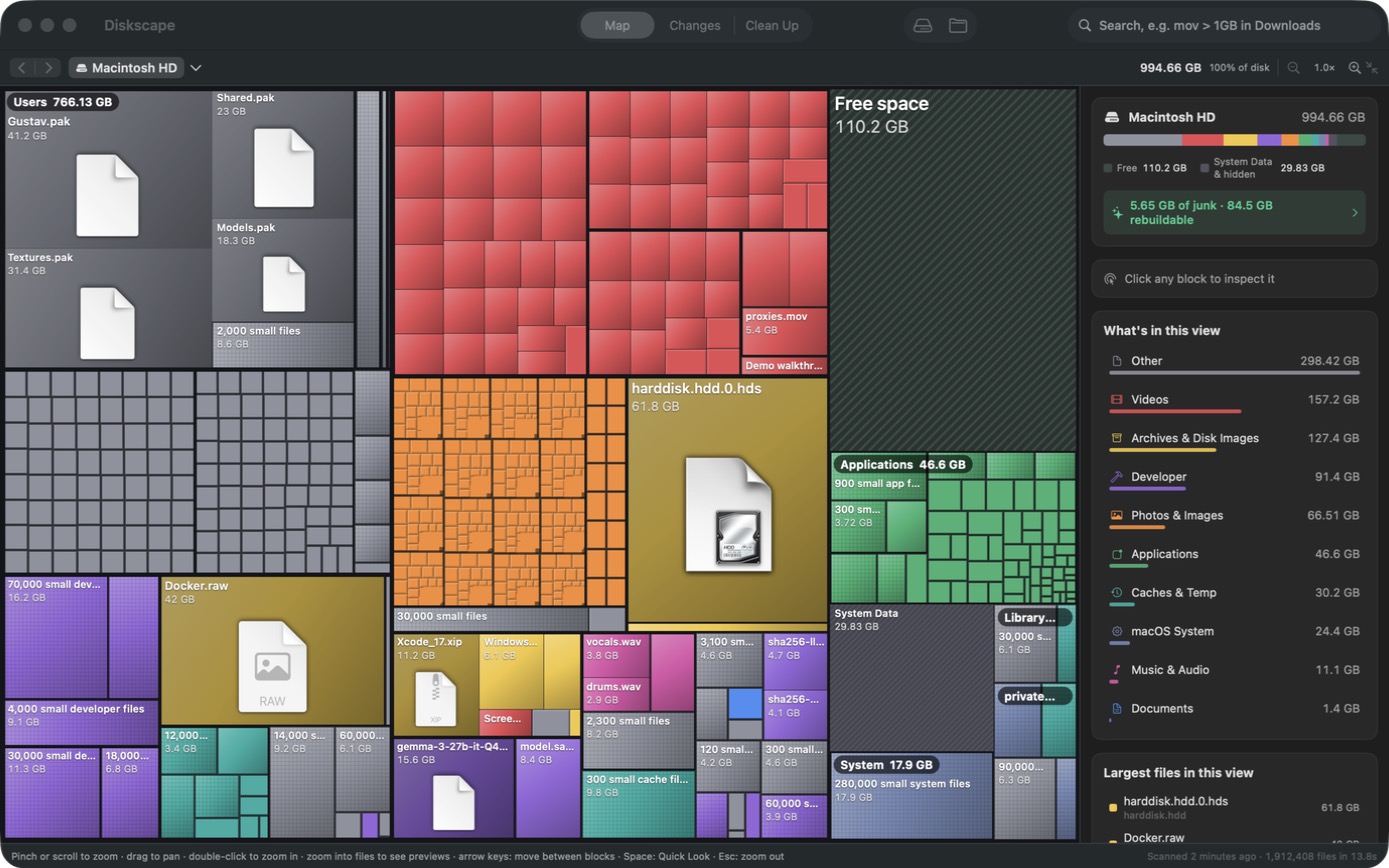
Diskscape's map of a Mac's disk: every file and folder is a rectangle sized by the space it takes, coloured by type, with free space and system data shown as blocks too.
✓

Honest cleanup

Junk, rebuildable files and your own data are kept apart. Diskscape never calls a virtual machine or a phone backup "safe to delete".

↗

See what grew

Compare with yesterday, last week or last month, and see when your disk will be full at the current rate.

⌁

Fully offline

No account, no subscription, no analytics. Diskscape never connects to the internet — not even to check its license.

Clean Up

Know what's really safe to delete.

Most cleaners promise one-click magic. Diskscape tells you what deleting each thing would cost you, in plain words.

Junk — nothing to loseTemporary leftovers, logs and the Trash. Nothing you'd miss.
Rebuilds or re-downloadsCaches, build folders and installers. They come back on their own, but that costs time or a download.
Your data — check firstVirtual machines, backups, games, AI models. Only you can decide.

Clear a whole group in one go, or ⌘-click blocks on the map to pick several and send them to the Trash together.
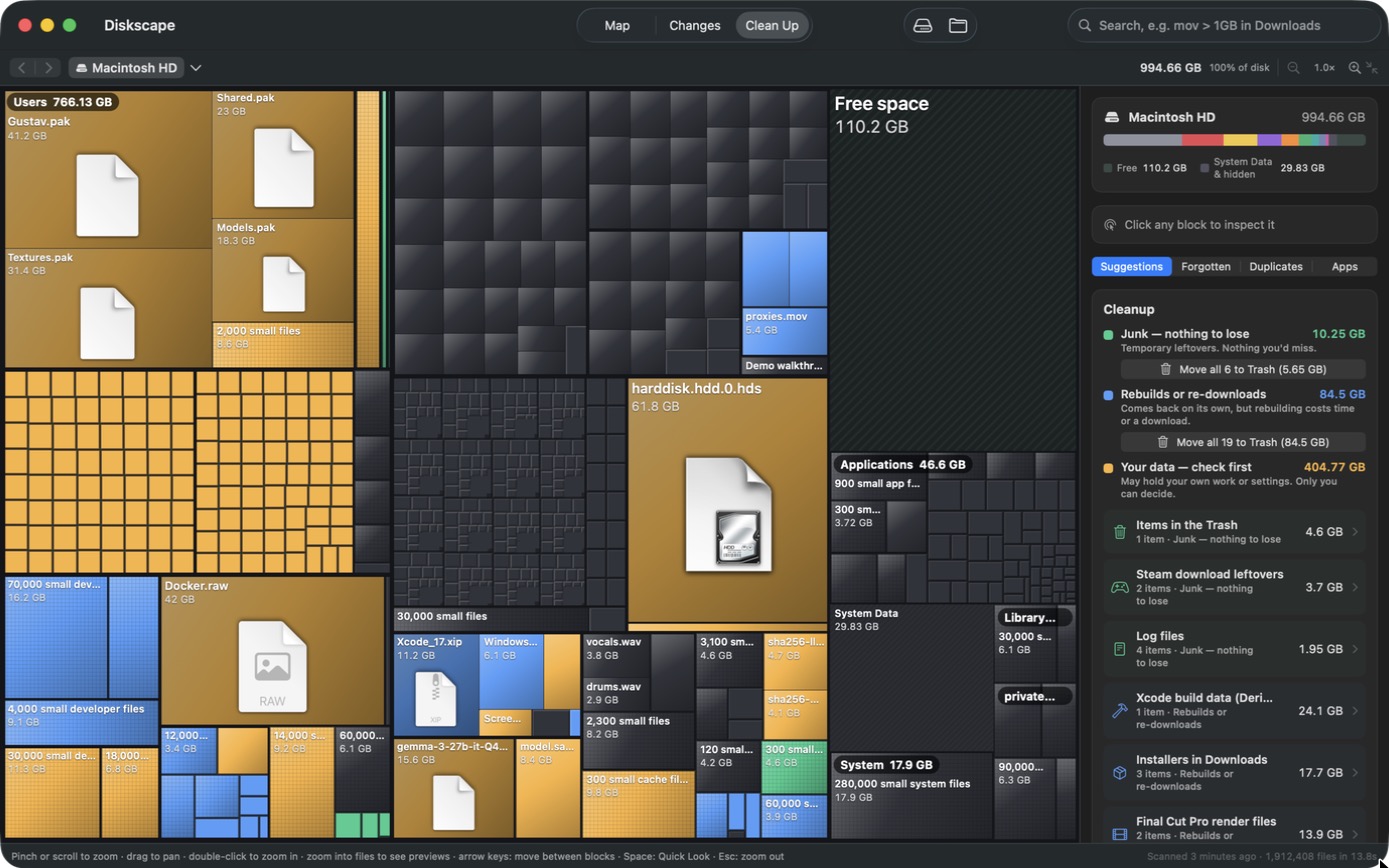
The Clean Up tab: the map coloured by what deleting costs, and a sidebar with 10.25 GB of junk and 84.5 GB that rebuilds, each with a button to move the whole group to the Trash, and the user's own data to check first.
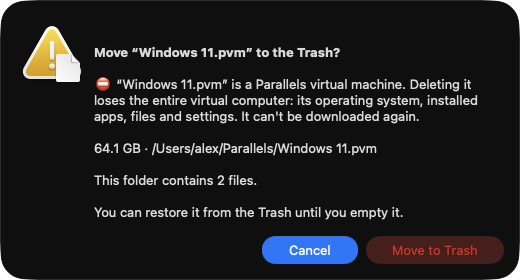
A confirmation dialog: Windows 11.pvm is a Parallels virtual machine; deleting it loses the entire virtual computer. Cancel is the default button.
Safety

A clear warning where it matters.

Deleting a virtual machine, an iPhone backup, a photo library or an AI model you trained yourself shows exactly what you would lose — and Cancel is the default button.

Everything goes to the Trash first, and Undo puts it right back. Keychains can't be deleted at all.

Uninstaller

Uninstall apps completely — and keep what's yours.

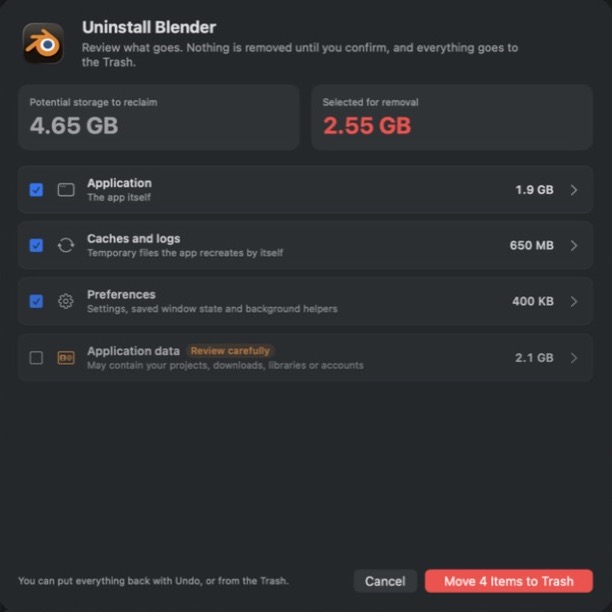
Dragging an app to the Trash leaves its caches, settings and data behind, sometimes gigabytes of them. Drop an app on Diskscape and see everything it keeps, sorted by what it is.

The app, its caches and its settingsTicked for you: the app itself, temporary files it recreates, preferences and saved state.
Its data — never ticked for youProjects, downloads, libraries and accounts stay unless you choose to remove them.

Nothing goes until you confirm. Everything goes to the Trash, and Undo puts it back.

Uninstall Blender: 4.65 GB found in total. The app, its caches and its preferences are ticked (2.55 GB selected); its application data, 2.1 GB, is marked 'Review carefully' and left unticked.
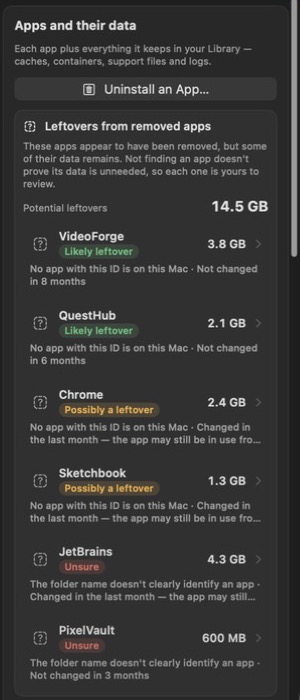
Leftovers from removed apps: 14.5 GB in total, with VideoForge and QuestHub marked likely leftovers, Chrome and Sketchbook possibly leftovers, and two folders marked unsure, each with the reason why.
Leftovers

Find what deleted apps left behind.

An app you removed years ago can still fill gigabytes of your Library. Diskscape finds data whose app is gone — and says how sure it is, and why.

Likely leftoverNo app with that ID is on your Mac, and the data hasn't been touched in months.
Possibly a leftoverIt changed recently, or another app from the same company may share it.
UnsureThe folder name doesn't clearly identify an app.

A missing app doesn't prove its data is unneeded, so there's no "remove all": you review each one.

Changes

See what grew — and when you'll run out.

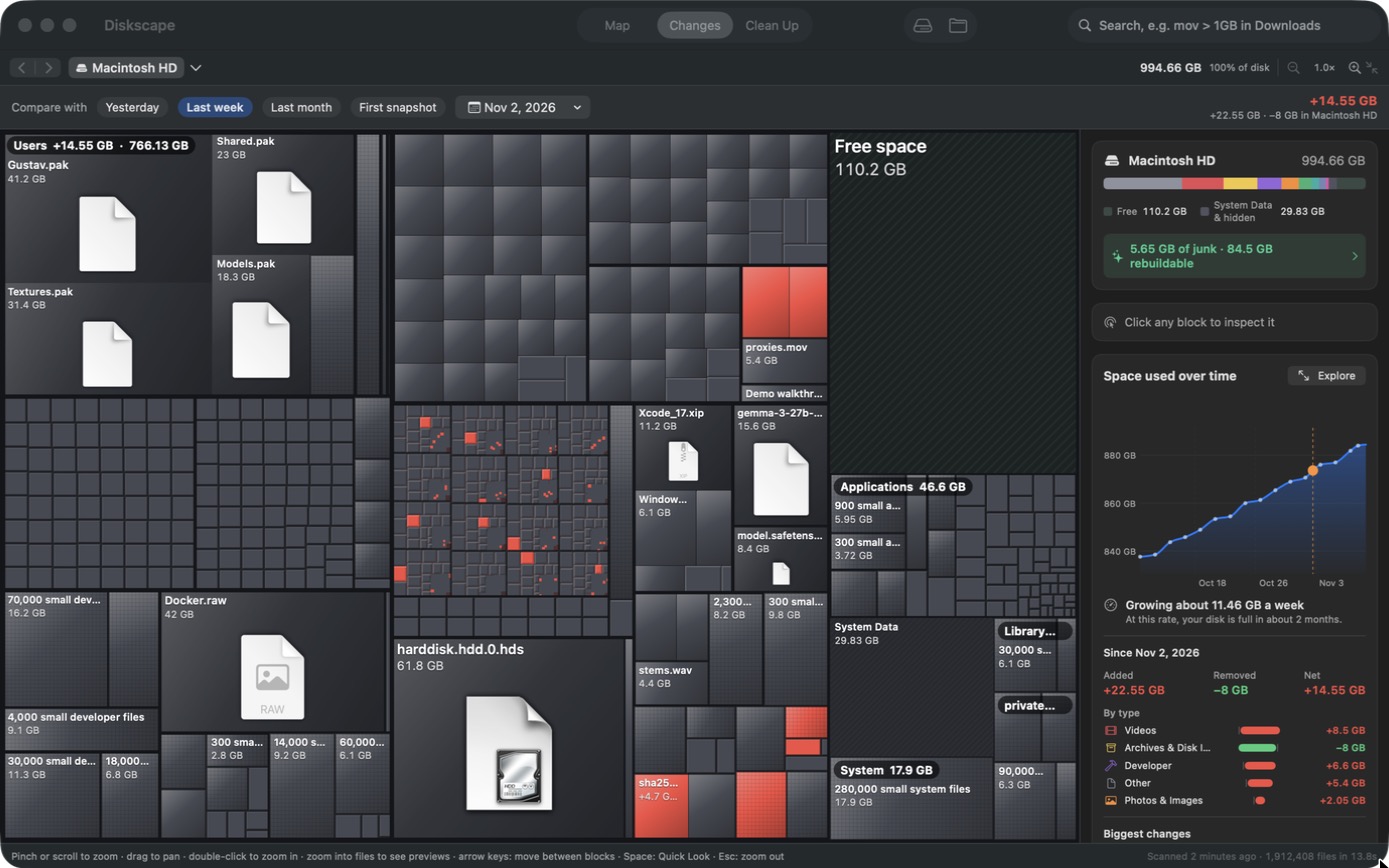
Diskscape quietly keeps snapshots of your disk. Pick yesterday, last week or last month: what grew turns red, what shrank turns green.

The sidebar shows the change by type, the biggest new files, and a forecast like "at this rate, your disk is full in about 2 months".

The Changes tab: blocks that grew in the last week highlighted in red, a chart of space used over a month, and a forecast that the disk is full in about two months.
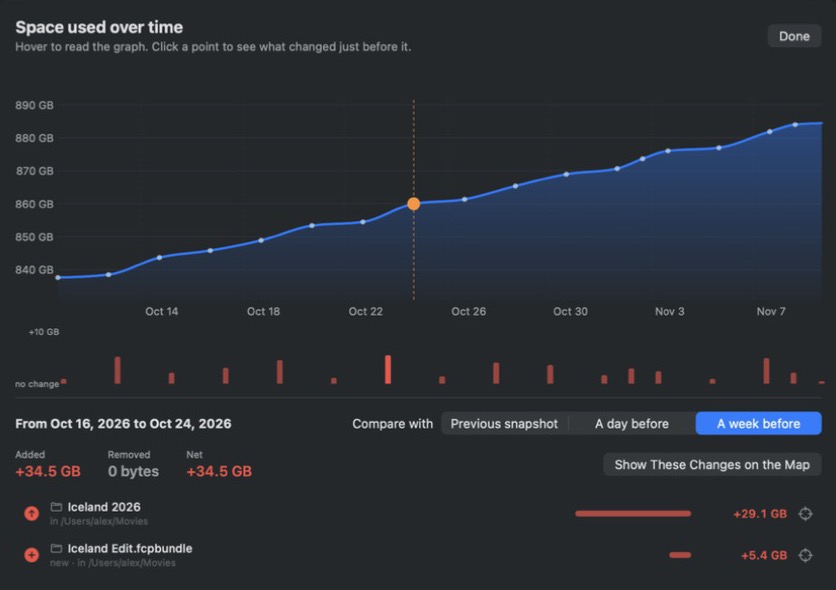
The timeline window: space used over a month, with bars for each jump. The picked week shows +34.5 GB added: a folder called Iceland 2026 (+29.1 GB) and a new Final Cut library (+5.4 GB).
Timeline

"What filled my disk?" Click the jump.

Open the timeline in a big window and hover to read any day. Click a jump and Diskscape lists exactly what was added or removed around it — down to the folder that explains it.

Made for Macs that do real work

Knows what developers and creators fill their disks with.

Diskscape recognises 45 kinds of space hogs and explains each one — what it is, which app made it, and how to get rid of it properly.

node_modulesXcode DerivedDataiOS Simulators DockerLM Studio modelsOllamaHugging Face npm · uv · Cargo · Gradle cachesFinal Cut render filesDaVinci Resolve cache Steam gamesiPhone backupsInstallers in DownloadsiCloud downloads

Explore like Finder

Double-click to open any folder, go Back and Forward like a browser, or jump in from the path bar. Pinch to zoom; press Space for Quick Look.

Duplicates without deleting

Merge identical files into APFS clones: every copy stays where it is, and the wasted space comes back.

Fast

2.2 million files mapped in about 14 seconds on our test MacBook Pro. The map stays smooth at any zoom.

Privacy

Your files never leave your Mac.

A disk analyzer sees everything you own. So Diskscape is built to never send anything anywhere.

  • No internet connection, ever: no update checks, no analytics, no crash reports.
  • No account and no subscription.
  • Your license key is checked on your Mac, with no activation server.
  • This website uses no cookies, trackers or outside fonts.
Pricing

One price. Yours to keep.

€14.99 one-time

or $14.99 · local prices include VAT where it applies

  • A personal license for up to 3 Macs
  • Free updates for every version 1 release
  • Try everything free for 14 days first
  • After the trial, you can still explore your disk for free; cleaning up needs a license

Questions

Why isn't Diskscape in the Mac App Store?

App Store apps live in a sandbox that can't read your whole disk, so a disk map from the App Store can only show part of the picture. Diskscape is signed by its developer and checked by Apple (notarized), like other apps you download from the web.

Can Diskscape uninstall apps?

Yes. Drop an app on Diskscape (or choose File › Uninstall an App) to see the app, its caches, its settings and its data, each with its size. The app, caches and settings are ticked for you; its data never is, because it may hold your projects or downloads. Everything goes to the Trash, with Undo.

How does it know an app's leftovers?

Apps keep data in your Library under their ID (like com.company.app). When no app with that ID is on your Mac, Diskscape lists the data with a confidence level and the reasons: whether the ID is clear, whether another app from the same company is installed, and when it was last touched. It never removes leftovers for you in bulk.

Is it safe to use?

Diskscape only suggests things it recognises, explains each one, and sorts them by what deleting costs. Everything goes to the Trash first and Undo puts it back. Deleting high-stakes things — virtual machines, backups, photo libraries — shows a clear warning with Cancel as the default.

What happens when the trial ends?

You can keep exploring your disk, its history and the cleanup suggestions for free. Moving files to the Trash, merging duplicates and removing downloads need a license.

Do I need to give it Full Disk Access?

No, but it helps. Without it, macOS hides some folders (Mail, Messages, other apps' data), and Diskscape shows exactly which ones. You can turn it on in System Settings › Privacy & Security at any time.

What is "System Data", and why is it so big?

It's space a file scan can't attribute to your files: swap, APFS snapshots, Time Machine local copies and system volumes. Diskscape breaks it down honestly instead of hiding it. More about System Data.

Does it work with external drives?

Yes. Every local drive appears on the start screen, and you can drop any folder or drive on the window to map it.

Which Macs does it run on?

Any Mac with macOS 14 Sonoma or later, Apple silicon or Intel.

How do I move my license to a new Mac?

Paste the same key from your receipt email into Diskscape on the new Mac (Diskscape › Enter License). One license covers up to 3 of your Macs.